
Setting permissions for the clinic admin
Setting Permissions for the Clinic Admin
In a busy clinic or practice, admins often handle tasks that keep practitioners focused on patient care. These permissions let you define exactly what your admin can access — so the right people have the right tools, and sensitive patient information stays protected. This guide walks you through how to set and customize those permissions.
The actions described in this lesson require a Manager permission on your clinic.
Accessing Clinic Admin Permissions
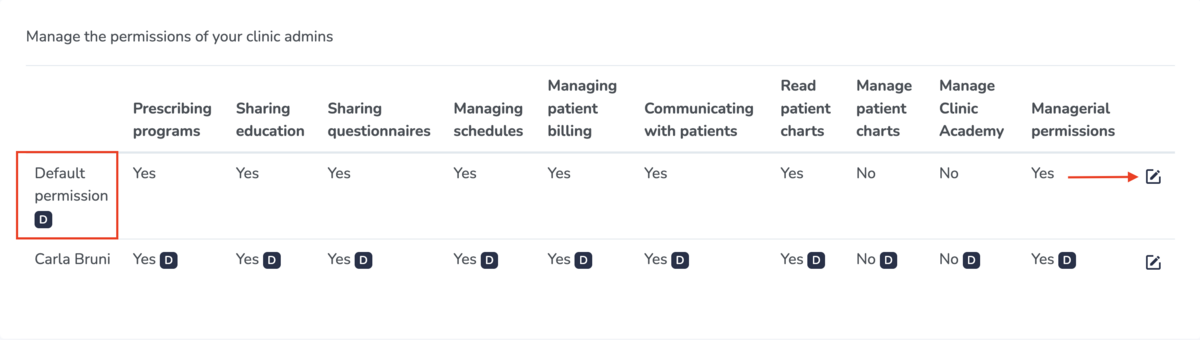
You'll find the Clinic admin permissions by going to the Settings tab in the top nav bar, and then on Clinic admin permissions under the My clinic section.
Here you can set default permissions for all the Clinic Admins in your clinic, or create personalized permissions for each admin by using the pencil icon.
Available Permissions
You can set the following permissions for each of your Clinic Admins:
Prescribe Programs
Allows the clinic admin to prescribe home exercise programs to patients.
Share Education
Allows the clinic admin to share educational resources with patients.
Share Questionnaires
Allows the clinic admin to send questionnaires to patients.
Manage Schedules
Allows the clinic admin to view and manage practitioner schedules.
Manage Patient Billing
Allows the clinic admin to manage invoices and billing for patients.
Communicate with Patients
Allows the clinic admin to send and receive messages with patients.
Read Patient Charts
Allows the clinic admin to view patient charts.
Manage Patient Charts
Allows the clinic admin to read, add new charts, update existing charts, delete charts, and sign charts.
Manage Clinic Academy
Only relevant if your clinic has a Clinic Academy set up. Allows the clinic admin to manage your Clinic Academy, including creating and publishing content in your courses for patients/the general public.
Managerial Permissions
Gives the clinic admin permission to manage everything in your clinic, including inviting other practitioners to join your clinic, changing your billing information used on Embodia, setting up your services, payment methods, questionnaires, and more.
In our guides, everything that requires a managerial permission will start with "The actions described in this lesson require a Manager permission on your clinic."